NEW UPDATE: Go Live Inside Virtual Pop-Ups
This is a massive update for Virtual Pop-Ups.
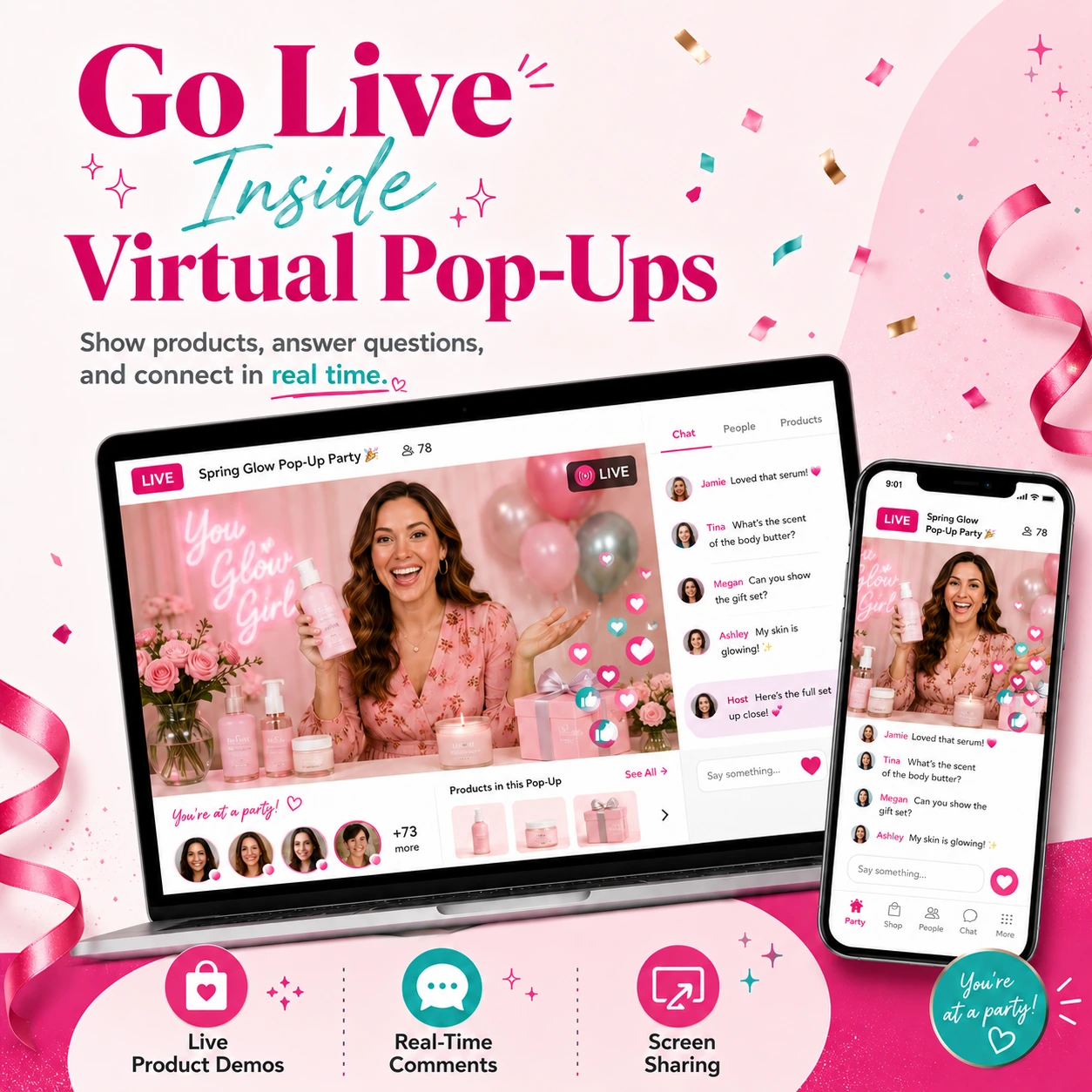
You can now go live inside your Virtual Pop-Up party.
That means you can show products, answer questions, do raffles, host giveaways, run demos, share updates, and connect with guests in real time.
All inside your Virtual Pop-Up.
No Facebook Live required.
No separate live link required.
No sending guests somewhere else just to watch.
Your live can happen right where the party is already happening.
This is a big deal because live video is one of the best ways to make an online party feel real.
Guests can see the products.
They can hear your voice.
They can ask questions.
They can interact.
They can feel more connected to the party.
And that can create more chances for sales.
Let’s walk through what’s new.
Why Live Streaming Matters for Direct Sellers
A lot of direct sellers need to go live.
Why?
Because some products are easier to sell when guests can actually see them.
Live video is great for:
✔ Product demos
✔ Unboxings
✔ Raffles
✔ Giveaways
✔ New product launches
✔ Flash sales
✔ Q&A sessions
✔ “How it works” demos
✔ Showing colors, sizes, bundles, or details
✔ Building trust with guests
Sometimes a post is not enough.
Sometimes guests need to see the product in action.
They may want to know:
“What does it look like in real life?”
“How big is it?”
“How do you use it?”
“What comes in the box?”
“What makes it special?”
“Which one should I choose?”
A live video gives you a better way to answer those questions.
And now you can do it directly inside your Virtual Pop-Up.
You Can Now Create a Live Post
Inside your Virtual Pop-Up, you can now create a Live Post.
This lets you start a live stream right inside the party.
Before going live, you can preview yourself.
You can also adjust your settings before the stream starts.
You can:
✔ Turn your microphone on or off
✔ Turn your camera on or off
✔ Switch microphone settings
✔ Switch camera settings
✔ Preview before starting
✔ Go live when you are ready
This helps you feel more prepared before guests join.
Once you are ready, you can start the stream.
Then your guests can join and watch inside the Virtual Pop-Up.
Guests Can Join the Live From the Party
When your stream starts, guests will see that the live has started.
They can click to join.
Once they join, they can watch the live stream inside the Virtual Pop-Up.
They do not have to leave the party.
That matters because every extra step can cause people to drop off.
If guests have to leave the party, open another app, find another link, or figure out where to go, some of them may not make it.
With the new live feature, the live is part of the party experience.
Guests can stay where they already are.
They can watch, comment, like, and interact inside the same party space.
That makes the experience smoother.
And a smoother experience can help keep guests engaged.
Comments Are Built Into the Live Experience
Live video works best when guests can interact.
That is why comments are built into the live experience.
Guests can write comments during the stream.
They can ask questions.
They can react to what you are showing.
They can reply and engage in real time.
For guests, comments can appear automatically during the live.
Short comments may switch quickly.
Longer comments can stay visible for more time so they are easier to read.
Guests can also turn the comment feed on or off if they want a cleaner viewing experience.
This gives guests flexibility.
They can watch with comments.
Or they can hide the comment feed and focus on the live.
Group Owners Can Manage Comments More Easily
The live experience is also built to help the group owner manage comments while streaming.
When comments come in, the group owner can see unread comments.
Instead of comments flying by too quickly, the group owner can focus on one comment at a time.
You can swipe to move through comments.
You can stay on one comment as long as you need.
You can also click a comment and jump to that exact comment in the comment section.
This is important.
When you are live, you do not want to miss a guest’s question.
A guest may ask:
“Where do I order?”
“Does that come in another color?”
“Can you show that again?”
“How much is it?”
“Is this part of the giveaway?”
“Can I still join the raffle?”
Those questions can lead to sales.
So being able to see and manage comments during the live is a big deal.
It helps you answer faster.
It helps guests feel seen.
And it helps keep the conversation moving.
You Can Share Your Screen
The new live feature also includes screen sharing.
That means you can share your screen during the live stream.
You can choose what you want to share, such as a screen, window, or tab.
Then you can stop sharing when you are done.
This gives you even more ways to use live video.
You could share:
✔ A shopping page
✔ A product collection
✔ A special offer
✔ A giveaway wheel
✔ A slideshow
✔ A training page
✔ A recipe
✔ A catalog
✔ A launch page
✔ A walkthrough
This is useful because not every live needs to be camera-only.
Sometimes you may want to show guests exactly where to click.
Or walk them through a collection.
Or show how to RSVP.
Or share a giveaway winner.
Screen sharing makes the live feature much more flexible.
You Can See Live Stats
During the live, the group owner can see helpful live stats.
You can see how many viewers are watching.
Guests can also see viewer information while they are watching.
This helps you understand what is happening during the stream.
You can see if people are joining.
You can see if they are watching.
You can adjust what you are doing based on the live activity.
That makes it easier to run a live that feels active and connected.
It Works on Desktop and Mobile
The live feature is built to work across desktop and mobile views.
Group owners can go live and manage the stream.
Guests can join and watch from their device.
The mobile view is designed so guests can still watch, comment, like, and interact.
That matters because many guests will join from their phones.
They may be watching from the couch.
In the car line.
At practice.
During a break.
Or while doing something else.
A good live experience needs to be easy on mobile.
Virtual Pop-Ups make that possible.
Guests Can Like and Comment During the Live
Guests can do more than just watch.
They can like the live.
They can comment.
They can reply.
They can interact during the stream.
That matters because interaction is what makes a party feel alive.
A live video should not feel like a one-way broadcast.
It should feel like a real party moment.
Guests can ask questions.
You can answer them.
They can react to products.
You can show more details.
They can get excited about raffles, giveaways, and offers.
That live interaction can help create more energy inside the party.
And more energy can lead to more engagement.
Your Live Recording Is Available After the Stream Ends
When the live stream ends, guests can see that the stream has ended.
The recording can also be available inside the party after the live is over.
This is important because not every guest can watch live.
Some guests may be busy.
Some may join late.
Some may want to rewatch.
Some may need to come back later.
With the live recording, your live video can keep working after the stream ends.
That means guests can still see your product demo, unboxing, raffle, giveaway, or explanation later.
This helps your party last longer than the live moment itself.
How Direct Sellers Can Use Live Streaming in Virtual Pop-Ups
This update opens up so many new ways to use Virtual Pop-Ups.
Here are a few ideas.
Product Demos
Show how a product works.
Let guests see it in real life.
Answer questions as they come in.
Unboxings
Open a new product live.
Show what comes inside.
Build excitement and curiosity.
Raffles
Go live to draw a winner.
Make it feel fun and real.
Keep guests watching and commenting.
Giveaways
Announce a giveaway.
Show the prize.
Pick winners live.
Create excitement inside the party.
Flash Sales
Go live to show limited-time offers.
Explain the deal.
Point guests to the shopping link.
Q&A Sessions
Answer guest questions live.
Help people choose products.
Remove confusion before they order.
Launch Parties
Use live video to introduce a new product, bundle, collection, or seasonal offer.
Make the launch feel like an event.
Team Trainings
Use Virtual Pop-Ups for more than customer parties.
You can also use live video to train your team, show examples, or walk through party strategies.
Why This Is Such a Big Deal
Virtual Pop-Ups were already a powerful way to host parties outside of Facebook.
You could invite guests with a simple link.
You could schedule posts.
You could collect guest info.
You could send notifications.
You could keep the party focused.
Now, with live streaming, Virtual Pop-Ups become even more powerful.
Because now you can bring the live party moment into the same space.
That means guests can:
✔ Join the party
✔ See your posts
✔ Click your links
✔ Watch your live
✔ Ask questions
✔ Comment
✔ Like
✔ Come back later
✔ Watch the recording
All inside the Virtual Pop-Up.
That is a huge step forward.
It makes Virtual Pop-Ups feel more like a complete party system.
Not just a place to post.
A place to connect.
A place to show products.
A place to create excitement.
A place to sell.
Important Beta Note
Live streaming is currently a beta feature.
It is ready to use.
We are just gathering data on how people use it during the beta.
So go try it.
Have fun streaming.
During beta, your live stream can last up to 30 minutes.
Quick Recap: What You Can Do With Live Streaming
Here is the simple version.
With the new live feature, you can:
✔ Create a live post inside your Virtual Pop-Up
✔ Preview yourself before going live
✔ Turn your camera or microphone on and off
✔ Switch camera or microphone settings
✔ Go live inside the party
✔ Let guests join from the Virtual Pop-Up
✔ See comments during the live
✔ Manage unread comments
✔ Share your screen
✔ See viewer stats
✔ Let guests like and comment
✔ Make the recording available after the live ends
This gives group owners a much better way to create real-time interaction inside Virtual Pop-Ups.
The Bottom Line
This is one of the biggest Virtual Pop-Up updates yet.
Live streaming gives direct sellers a better way to show products, answer questions, run giveaways, host raffles, do unboxings, and connect with guests.
And the best part?
It all happens inside your Virtual Pop-Up.
Your party does not have to send guests somewhere else.
Your guests can join, watch, comment, and come back later.
That makes the experience easier for guests and more powerful for group owners.
So if you use Virtual Pop-Ups, this is an update you will want to try.
Log into your PostMyParty dashboard, create a Virtual Pop-Up, and test the new live feature today.
Have fun streaming!