Introducing Virtual Pop-Ups: A Brand-New Way to Host Parties With PostMyParty
Big news for PostMyParty users:
Virtual Pop-Ups are here.
This is one of the biggest updates we’ve released because it gives you a whole new way to host parties outside of Facebook.
That means you can now create a party experience that is easier to access, easier to manage, and not limited by Facebook’s rules, delays, posting limits, or restrictions.
No Facebook group required.
No Chrome extension required.
No preloading posts.
No worrying about posts getting blocked.
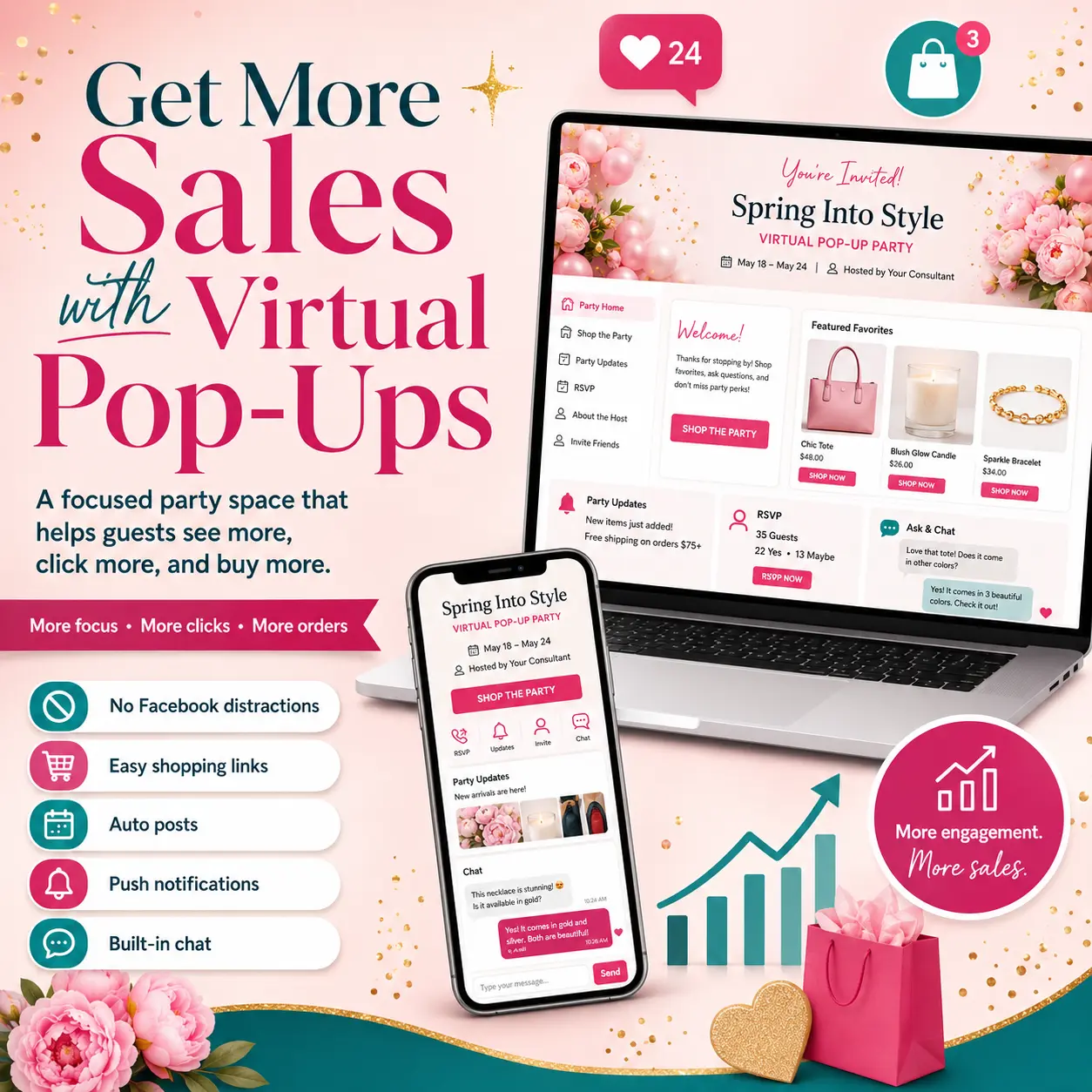
No guests getting distracted by ads, random posts, or everything else happening on Facebook.
Just your party, your posts, and your guests in one simple pop-up experience.
If you’ve ever had posts blocked, worried about “Facebook Jail,” had trouble reaching guests who don’t use Facebook, or wished your party posts could simply publish automatically without extra steps…
This feature was built for you.
With Virtual Pop-Ups, you can host your party in an off-Facebook location, invite guests with a simple link, collect their contact information, and have your posts show up automatically at the scheduled time.
And the best part?
Virtual Pop-Ups are included with your Basic PostMyParty subscription.
Let’s walk through what Virtual Pop-Ups are, why they matter, and how to create your first one.
What Are Virtual Pop-Ups?
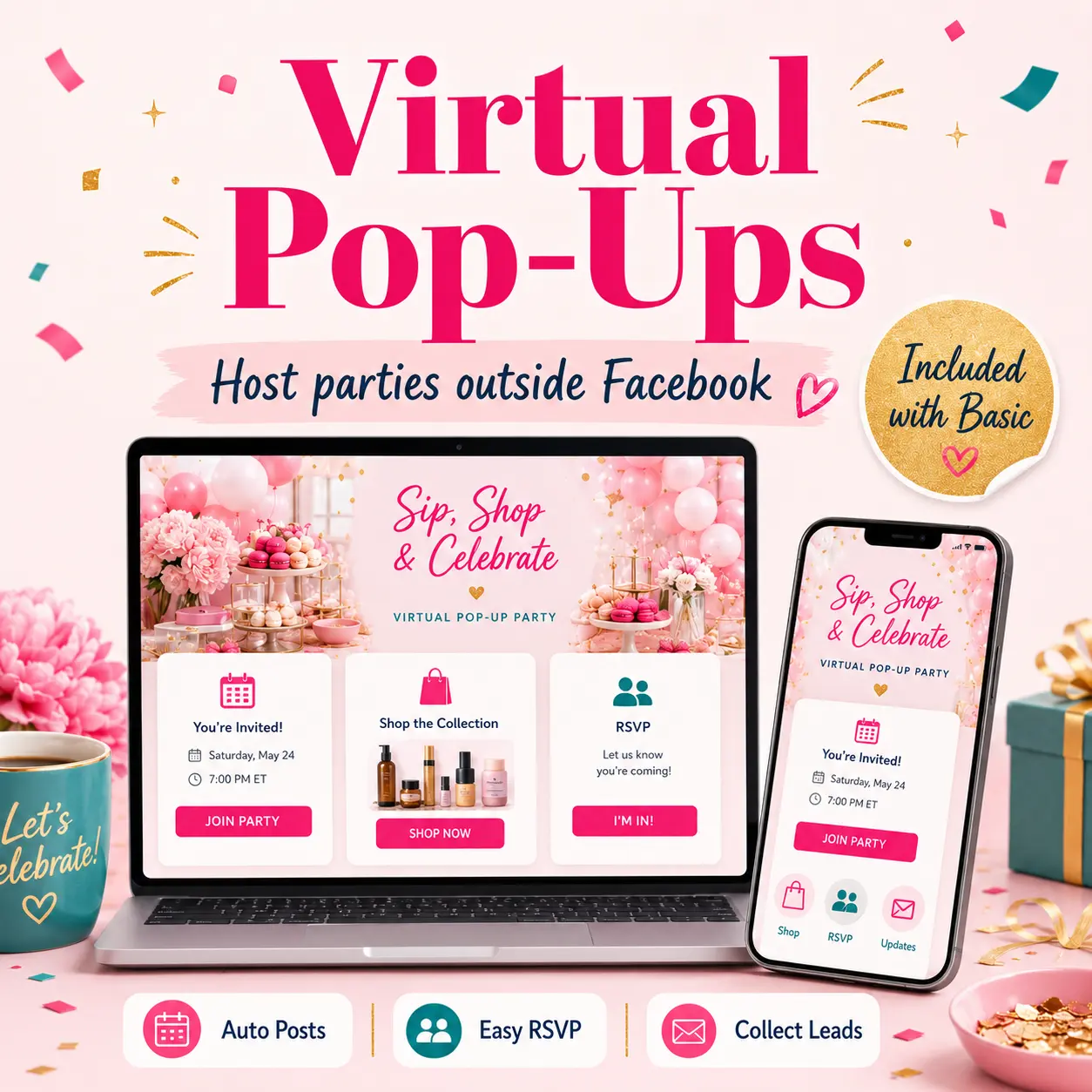
A Virtual Pop-Up is an online party hosted outside of Facebook.
Instead of sending guests to a Facebook group or event, you send them a special pop-up link.
When they click the link, they land on your RSVP page.
From there, they can enter their name, email address, and phone number if you choose to require it. Then they can enter your pop-up and see your scheduled party posts as they publish.
Think of it like your own simple party room.
Your posts appear there.
Your guests can interact there.
You can share links there.
You can follow up after the party.
And your guest information is saved in your PostMyParty dashboard.
Even better, your guests are not surrounded by ads, unrelated posts, notifications, or other distractions.
Inside your Virtual Pop-Up, the focus stays on your content.
This gives you more control over the party experience from start to finish.
Why Virtual Pop-Ups Are Such a Big Deal
Facebook parties have helped direct sellers for years.
But Facebook also comes with challenges.
Posts may not show the way you expect.
Guests may miss updates.
Posting too often can create issues.
Some customers do not use Facebook at all.
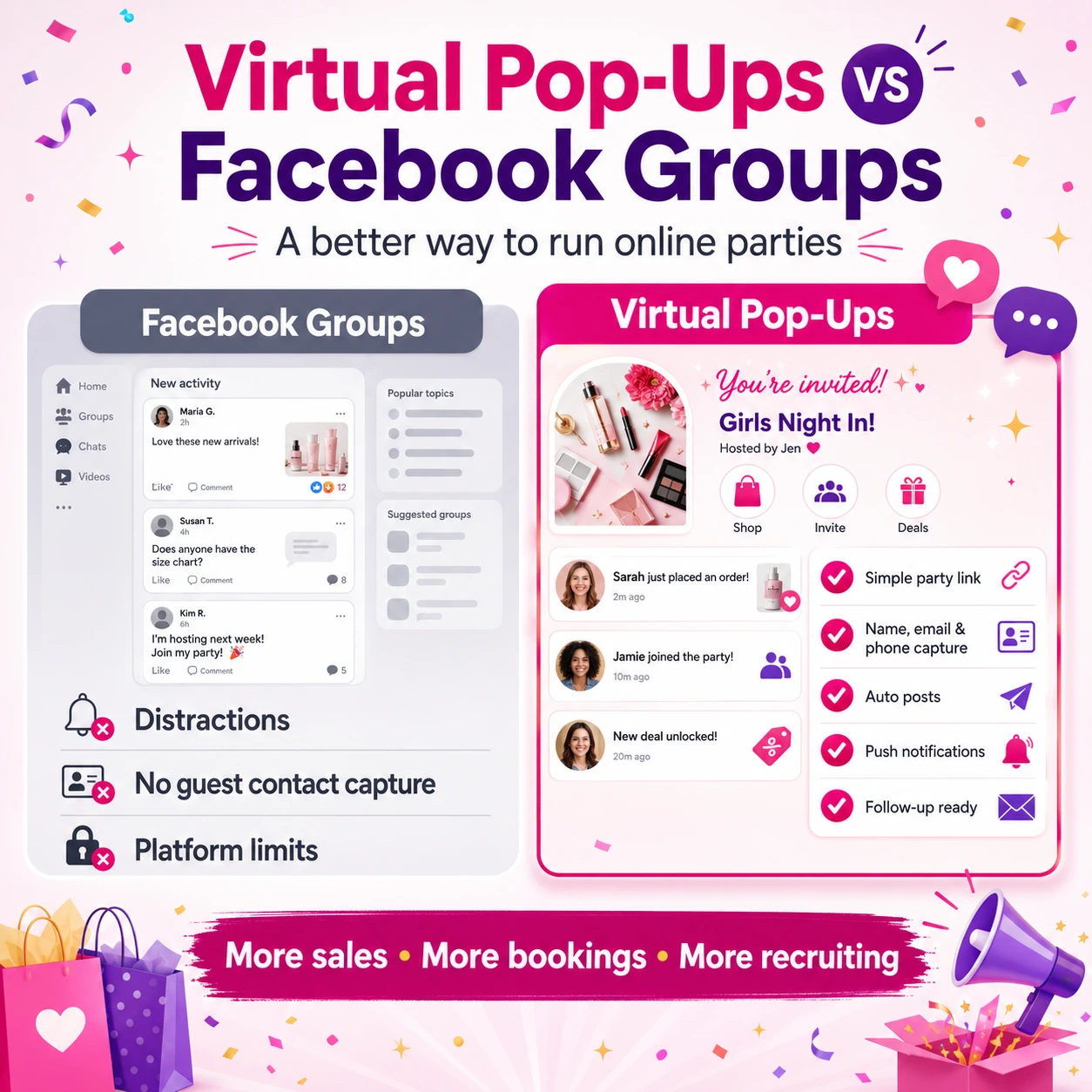
Guests can get distracted by ads, notifications, and unrelated posts.
And Facebook’s rules can change at any time.
Virtual Pop-Ups give you another option.
You can still run parties, share products, collect leads, and engage with guests, but without relying fully on Facebook.
Here are some of the biggest benefits.
1. You Can Reach Customers Who Don’t Use Facebook
Not everyone is active on Facebook.
Some people left Facebook years ago.
Some only check it once in a while.
Some do not want to join groups.
Some customers simply prefer a direct link.
Before, those people may have been hard to include in your parties.
Now, with Virtual Pop-Ups, you can invite them with a simple link.
They do not need to join a Facebook group to see your party.
They can visit your pop-up, RSVP, and view your content in one easy place.
Result:
You can reach more people, including customers who may have skipped your Facebook parties before.
2. You’re Not Limited by Facebook’s Rules and Posting Restrictions
One of the biggest frustrations with Facebook parties is trying to work around Facebook’s limitations.
You may worry about:
- Posts getting blocked
- Posting too often
- Spacing posts far enough apart
- Group rules changing
- Facebook limiting your activity
- Needing to avoid anything that looks too repetitive
That can make party planning stressful.
With Virtual Pop-Ups, your party is hosted outside of Facebook.
That means you are not bound by Facebook’s posting limitations in the same way.
Your posts publish automatically inside your pop-up at the scheduled time.
Result:
Less stress.
More control.
A smoother party experience.
3. Your Guests See Your Posts Without Facebook Distractions
This is a big one.
On Facebook, your party is competing with everything else in the feed.
Your guests may see:
- Ads
- Random posts
- Notifications
- Other group updates
- Suggested content
- Friends’ posts
- Videos
- Distractions that pull them away
That means even if someone joins your Facebook party, their attention can get pulled in several different directions.
With Virtual Pop-Ups, the experience is much cleaner.
Your guests are inside your pop-up.
They see your party posts.
They see your updates.
They see your links.
They see your content.
No ads.
No unrelated feed.
No competing distractions.
Just your posts, all the time, inside your pop-up party.
Result:
Guests can stay more focused on your party, your products, and your offers.
4. Posts Publish Automatically
This is a huge benefit.
With Virtual Pop-Ups, your scheduled template posts show up in your pop-up automatically.
You do not need to preload them.
You do not need to use the Chrome extension.
You do not need to manually copy and paste each post.
You choose your template, set your start date, confirm the details, and your party posts are scheduled to appear in your Virtual Pop-Up.
Result:
Your party can run more smoothly with less manual work.
5. Guest Contact Information Is Collected for You
When guests join your Virtual Pop-Up, they enter their contact information through your RSVP page.
Their name and email address are collected, and you can also choose whether to require their phone number.
That information is stored in your contacts list inside your PostMyParty dashboard.
This is a major advantage because follow-up is one of the most important parts of any party.
With Facebook parties, you may not always have a clear way to contact each guest after the party.
With Virtual Pop-Ups, you can collect the information you need to follow up more easily.
Result:
You can build your contact list and follow up with guests after the party is over.
6. You Can Add Helpful Link Buttons
Inside your Virtual Pop-Up settings, you can add links that show as clickable buttons.
These can help guests quickly find the most important places you want them to go.
For example, you can add buttons for:
- Shopping link
- Website
- Product catalog
- Survey
- Booking link
- VIP group
- Special offer
- Host rewards info
- New customer form
This keeps your pop-up clean and easy to use.
Instead of guests digging through posts to find a link, you can place important buttons where they are easy to access.
Result:
Guests have a smoother experience and can take action faster.
7. Guests Can Add the Party App to Their Home Screen
After guests RSVP, they have the option to install the party app to their home screen.
This makes it easier for them to come back to your Virtual Pop-Up without having to find the link again.
They can quickly return to the party, check new posts, and stay engaged.
Result:
Your pop-up becomes easier for guests to revisit throughout the party.
How to Create a Virtual Pop-Up in PostMyParty
If you have used PostMyParty before, the process will feel familiar.
The setup has three main parts:
- Creating the pop-up room
- Customizing the RSVP settings
- Inviting guests with your share link
Let’s walk through the basic steps.
Step 1: Start a New Party
From your PostMyParty dashboard, click:
Parties → New Party
Then select the Virtual Pop-Up option.
Click Next Step.
This tells PostMyParty that you want to create an off-Facebook party instead of a traditional Facebook party.
Step 2: Name Your Party
Next, enter a name for your party.
This name will be seen by your guests, so keep it clear and simple.
Examples:
- Spring Style Pop-Up
- VIP Customer Party
- Summer Favorites Event
- New Product Launch Party
- Hostess Rewards Pop-Up
- Holiday Gift Guide Party
Choose something that helps guests understand what the party is about.
Step 3: Choose the Start Date
Select the date you want your template posts to begin publishing.
This is important because your scheduled template will follow this start date.
If your party begins on Monday, choose Monday.
If it is a weekend pop-up, choose the correct weekend start date.
Step 4: Choose the Time Zone
Next, select the time zone you want your posts to follow.
This helps make sure your posts publish at the right times for your party.
Once that is selected, click Next Step.
Step 5: Choose Your Template
Now you will choose the template you want to schedule.
This will schedule all posts from that template to your Virtual Pop-Up.
If you already have party templates inside PostMyParty, this step should feel familiar.
Choose the template that best fits your pop-up.
For example:
- Product launch template
- Customer party template
- Booking party template
- Flash sale template
- Holiday shopping template
- VIP event template
Step 6: Fill In Replacement Tokens, If Needed
This step only appears if the template you selected uses replacement tokens.
If your template does not use tokens, PostMyParty will move you to the next step.
Replacement tokens are used to customize details in your template, such as names, dates, links, or other information.
If you reach this step and are not sure what to do, you can watch the replacement tokens tutorial in your dashboard or reach out to PostMyParty’s live support chat for help.
Step 7: Confirm and Schedule
The final setup step is to review your details.
Check that everything looks right.
You can preview your posts to make sure they are correct.
Double check:
- Party name
- Start date
- Time zone
- Template
- Replacement token details
- Post preview
Once everything looks good, scroll to the bottom and click:
Confirm and Schedule
And that’s it.
Your Virtual Pop-Up is created.
How to Customize Your RSVP Page
After your Virtual Pop-Up is created, you can customize the RSVP page.
This is the page guests see first when they visit your pop-up link.
It is important because this is where guests decide to join and where their contact information is collected.
To customize it, click Edit Party.
From there, you can adjust several helpful settings.
Add a Cover Photo
A cover photo can make your Virtual Pop-Up feel more polished and inviting.
You can use an image that matches the theme of the party.
Examples:
- Product collection image
- Seasonal graphic
- Host party image
- Sale announcement image
- Branded party banner
You do not have to overthink this.
A simple, clear image can make the page feel more professional.
Edit the Party Name
You can update the party name if needed.
Make sure it is guest-friendly and easy to understand.
Instead of something internal like:
May Template Party #4
Use something more inviting like:
Spring Favorites Pop-Up
or
VIP Customer Shopping Party
Add a Description
Your description tells guests what the pop-up is about.
Keep it simple.
You can include:
- What the party is
- What guests can expect
- Whether there are giveaways or specials
- How long the pop-up will last
- What action you want them to take
Example:
Join us for a fun online pop-up featuring customer favorites, simple tips, special offers, and a few surprises. RSVP below to enter the party and see all the posts.
Add Hosts
Once your host or hosts have joined the pop-up, you can add them as hosts of the party.
This is helpful if you are running a hosted event and want the host connected to the experience.
Customize the RSVP Form
The RSVP form collects your guests’ information.
By default, guests can enter their name and email address.
You also have the option to require a phone number.
This is useful if you want to follow up by text or make sure you have another way to contact guests.
Use this thoughtfully and make sure your guests know what they are agreeing to.
Customize the URL Slug
Your URL slug is automatically created, but you can customize it if you want.
A clean URL can make your pop-up feel easier to share.
For example:
- spring-style-pop-up
- vip-customer-event
- summer-favorites
- holiday-gift-party
Keep it short and easy to read.
Add Link Buttons
You can also add clickable buttons to your pop-up.
These are great for important links.
Use buttons for:
- Shop now
- View catalog
- Join my VIP group
- Book a party
- Fill out a survey
- View special offers
- Visit my website
- Contact me
This makes your pop-up easier to navigate.
Guests can quickly find the most important links without searching through posts.
When you are done customizing your settings, click Save Changes.
How Guests Join Your Virtual Pop-Up
Once your Virtual Pop-Up is ready, you will copy the share link at the bottom of the party settings.
This is the link you send to your guests.
When guests click the link, they will arrive at your RSVP page.
From there, they will:
- Enter their name and email address
- Enter their phone number if required
- Accept the terms and conditions
- Submit the RSVP form
- Choose whether to install the party app to their home screen
- Enter your Virtual Pop-Up
Once inside, they can see your posts, interact with you, and engage with other guests.
Your posts will appear inside the pop-up according to the schedule you set.
And because the party is hosted in your own pop-up space, guests are not being pulled away by Facebook ads, notifications, or unrelated content.
They are there for your party.
Simple Ways to Use Virtual Pop-Ups
Virtual Pop-Ups can be used in many different ways.
Here are a few ideas.
Product Launch Pop-Up
Launching something new?
Create a pop-up just for the new product.
Use your posts to share:
- What is new
- Who it is for
- Why people will love it
- How to order
- Special launch offers
- Customer questions
- Final reminder
This gives your launch one clear place to live.
VIP Customer Pop-Up
Create a special event for your best customers.
You can use it for:
- Exclusive offers
- Early access
- Customer appreciation
- New arrivals
- Giveaways
- Limited-time specials
This can make your customers feel valued and included.
Hostess Pop-Up
If you work with hosts, Virtual Pop-Ups can make hosting easier.
Your host can share one simple link with guests.
Guests RSVP, enter the pop-up, and view the party in one place.
You can also add links for shopping, booking, or learning more.
Flash Sale Pop-Up
Running a short sale?
A Virtual Pop-Up can help you keep the sale focused.
You can schedule:
- Sale announcement
- Product highlights
- “Only a few hours left” reminder
- Best-seller post
- Final call post
This gives the sale a clean, dedicated space.
Holiday Gift Guide Pop-Up
During busy shopping seasons, create a pop-up around gift ideas.
You can organize posts by:
- Gifts under a certain price
- Gifts for moms
- Gifts for teachers
- Gifts for friends
- Stocking stuffers
- Last-minute gifts
Then add a shopping link button so guests can order easily.
Team Training Pop-Up
Virtual Pop-Ups are not only for customers.
You can also use them for team training.
Create a simple training pop-up with scheduled lessons, reminders, links, and follow-up content.
This can be useful for onboarding, challenges, product education, or team events.
Tips for a Great Virtual Pop-Up
You do not have to use every feature to create a great experience.
A simple pop-up can still look professional and work well.
Here are a few tips.
Keep the RSVP Page Clear
Tell guests exactly what they are joining.
Do not make the description too long.
Focus on:
- What it is
- Why they should join
- What they will get
- What to do next
Add a Strong Cover Image
Your cover image helps set the tone.
Use something clean, bright, and relevant to the party.
This makes your pop-up feel more polished right away.
Use Link Buttons Wisely
Do not overload guests with too many buttons.
Choose the most important ones.
A good starting point could be:
- Shop Now
- Join VIP Group
- Book a Party
- Contact Me
Keep it simple.
Schedule Your Posts With a Clear Flow
Your pop-up should feel easy to follow.
A simple flow might be:
- Welcome post
- What to expect
- Product spotlight
- Helpful tip
- Customer favorite
- Special offer
- FAQ
- Final reminder
- Thank-you post
This keeps guests engaged without overwhelming them.
Follow Up After the Party
Do not stop when the pop-up ends.
Follow-up is where many sales happen.
Use the contact information you collected to reach out.
You can follow up with:
- People who asked questions
- People who clicked links
- People who showed interest
- Guests who joined but did not order
- Guests who may want to host
Because their contact information is saved in your PostMyParty dashboard, you have a better way to keep the conversation going after the party is over.
✅ Quick Recap: Why Virtual Pop-Ups Matter
Virtual Pop-Ups help you:
✔ Host parties outside of Facebook
✔ Reach customers who do not use Facebook
✔ Avoid Facebook posting restrictions
✔ Publish posts automatically
✔ Skip the Chrome extension for these parties
✔ Collect guest contact information
✔ Build your contact list
✔ Add clickable link buttons
✔ Give guests a cleaner party experience
✔ Avoid Facebook ads and distractions
✔ Keep the focus on your posts and offers
✔ Create a more flexible party experience
This is a big step forward for direct sellers who want more control, more flexibility, and less stress.
🏆 What This Means for Direct Sellers
Virtual Pop-Ups give you another way to grow your business.
You are no longer limited to only Facebook-based parties.
You can now create a pop-up experience that is easier to share, easier to revisit, and easier to follow up from.
This can help you:
- Include more customers
- Run smoother events
- Save time
- Build your contact list
- Follow up more easily
- Avoid Facebook posting headaches
- Keep guests focused without ads or distractions
- Create a more professional party experience
And because it is included with your Basic PostMyParty subscription, you can start using it without adding another tool to your business.
🙌 Virtual Pop-Ups Are Here
We are so excited to bring Virtual Pop-Ups to PostMyParty.
This feature was built to help direct sellers host parties with more freedom, more flexibility, and less stress.
Whether you are running a product launch, customer party, VIP event, flash sale, holiday gift guide, or team training, Virtual Pop-Ups give you a new way to bring people together outside of Facebook.
You can create the pop-up.
Customize the RSVP page.
Collect guest information.
Schedule your posts.
Add helpful links.
Invite guests with one simple link.
And follow up when the party is over.
It is simple.
It is flexible.
And it opens up a whole new way to use PostMyParty.
Most importantly, it gives your guests a dedicated place to focus on your party without Facebook ads, unrelated posts, or outside distractions pulling them away.
🎉 Ready to Try Virtual Pop-Ups?
Your first Virtual Pop-Up is just a few clicks away.
From your PostMyParty dashboard, go to:
Parties → New Party → Virtual Pop-Up
Choose your party name, start date, time zone, and template.
Then customize your RSVP page, copy your share link, and invite your guests.
We cannot wait to see how you use Virtual Pop-Ups in your business.
Try it inside your PostMyParty dashboard today and start hosting parties outside of Facebook.